VisionOps Crew: A Multi-Agent Architecture for Computer Vision Operations
Computer vision engineering remains a highly fragmented discipline. Building high-performing vision models often requires developers and practitioners to manually coordinate model and dataset discovery, local development environments, visual data inspection, notebook-based experimentation, hardware constraints, and implementation artifacts.
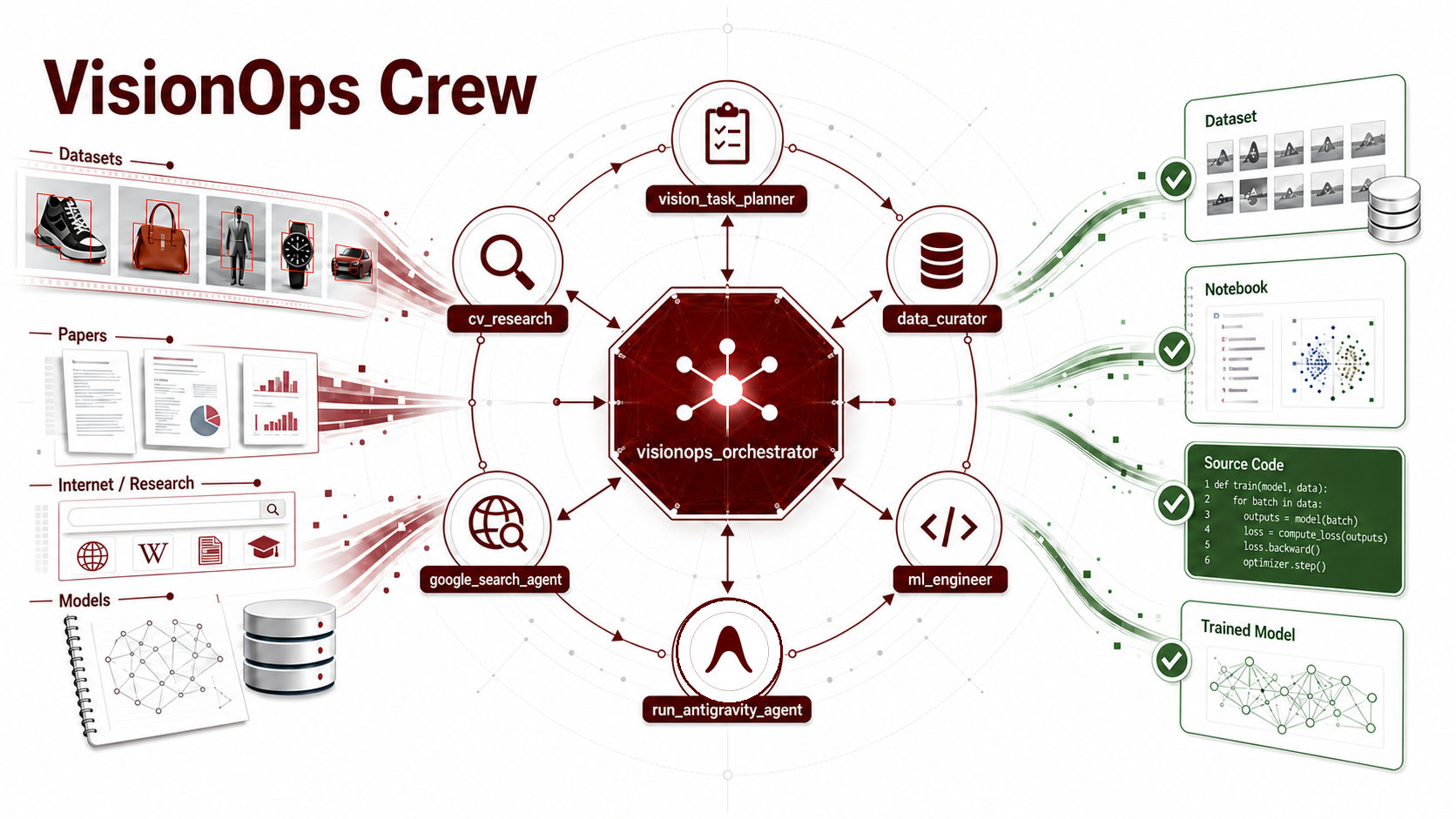
visionops_crew addresses this fragmented middle ground as a multi-agent assistant for practical computer vision workflows. It transforms open-ended objectives into actionable plans, identifies relevant models and datasets, evaluates visual data quality, assesses local hardware constraints, supports notebook-based prototyping, and produces implementation-ready artifacts.
Rather than requiring users to coordinate each tool and process independently, visionops_crew brings together a team of specialized agents within a unified multi-agent architecture built with the Google Agent Development Kit (ADK). The crew includes a task planner, computer vision researcher, data curator, ML engineer, web search capability, and an optional Antigravity SDK integration. Through Model Context Protocol (MCP) integrations and skill-based capabilities, these agents connect with specialized computer vision and AI tools—including Hugging Face, FiftyOne, and Jupyter—enabling research, data inspection, experimentation, and implementation to continuously inform one another throughout the computer vision lifecycle.
Introduction
Building computer vision applications today requires coordinating a heterogeneous ecosystem, not simply training a model. A typical workflow spans model and dataset registries, local media storage, annotation schemas, visual inspection platforms, notebooks, accelerator-specific runtime constraints, and generated implementation artifacts. Each component maintains its own state, assumptions, and potential failure modes.
The most costly errors often emerge at the boundaries between these components. A dataset may load successfully while its semantic label field remains ambiguous. A model recommendation may be sound in principle yet incompatible with the available hardware. A notebook prototype may validate a preprocessing strategy without ever becoming part of a reusable training pipeline. These are not merely isolated coding mistakes; they are coordination failures across research, data, runtime, and implementation contexts.
visionops_crew is designed to close this gap. It is an orchestrated multi-agent assistant for computer vision operations, built with Google’s Agent Development Kit (ADK), Model Context Protocol (MCP) integrations, skill-based capabilities, and a scoped Antigravity SDK integration for opt-in artifact generation. Its purpose is not to replace researchers, engineers, or practitioners, but to preserve task context while routing each step to the specialized agent or tool best equipped to gather evidence, inspect system state, conduct experimentation, or produce implementation-ready artifacts.
What You Will Learn
In this post, I examine the problem, architecture, and key implementation decisions behind visionops_crew. The discussion focuses on engineering patterns that researchers and technical practitioners can apply when building agentic systems for scientific and machine learning workflows:
-
Decomposing complex workflows into specialized agents with clearly defined responsibilities, tool boundaries, and failure modes that can be adapted across domains.
-
Integrating the Antigravity SDK safely by placing it behind an explicit tool boundary controlled by the orchestrator.
-
Extending agent capabilities through MCP and skills by providing structured access to external services, local tools, notebooks, and runtime environments—not only text generation and reasoning.
-
Distributing reasoning while reducing context overhead by routing research, data inspection, runtime validation, and implementation decisions to the agents best suited to handle each part of the workflow.
Why Traditional Computer Vision Pipelines Break Down
Computer vision projects are particularly vulnerable to coordination failures because their data, annotations, model architectures, and runtime environments are tightly interdependent. Unlike many text-based workflows, where tokenization and batching provide relatively consistent abstraction boundaries, visual machine learning workflows must account for:
-
Media representation: Raw images, videos, tiled rasters, frame sequences, and multispectral inputs require different loading strategies and preprocessing assumptions.
-
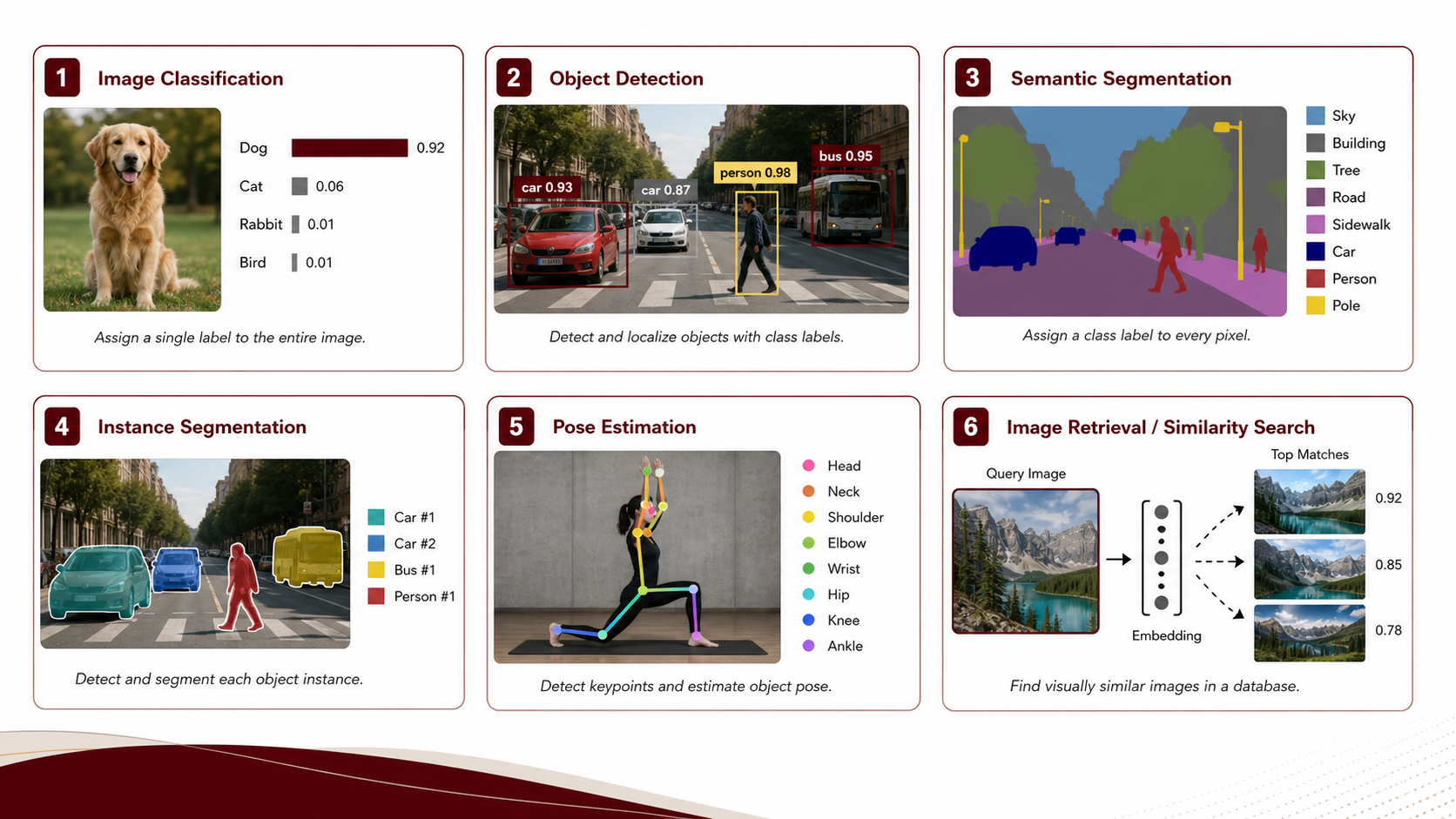
Annotation semantics: Classification labels, bounding boxes, segmentation masks, keypoints, captions, and embeddings require distinct schemas, evaluation metrics, and validation procedures.
-
Model–task alignment: A model tagged for image classification may still be unsuitable for a particular label space, visual domain, licensing requirement, or deployment target.
-
Runtime constraints: CUDA, Apple Silicon MPS, CPU-only environments, numerical precision, and memory limitations directly affect model selection, feasible batch sizes, and implementation strategy.
In a conventional workflow, practitioners must move manually between these contexts. They might browse Hugging Face to identify a suitable dataset or model backbone, download a subset locally, inspect its annotations in a visual exploration platform, write conversion code, prototype an approach in a notebook, and eventually translate those findings into a reusable training pipeline.
However, critical observations from one stage rarely propagate automatically to the next. A label imbalance discovered in FiftyOne may not be reflected in the training configuration. A hardware constraint identified in a terminal session may not influence model selection. A notebook visualization may never be linked to the specific dataset version that produced it. As a result, valuable context becomes fragmented across tools, increasing the risk of inconsistent assumptions and implementation errors.
The following diagram illustrates how this fragmentation appears across a typical computer vision lifecycle.
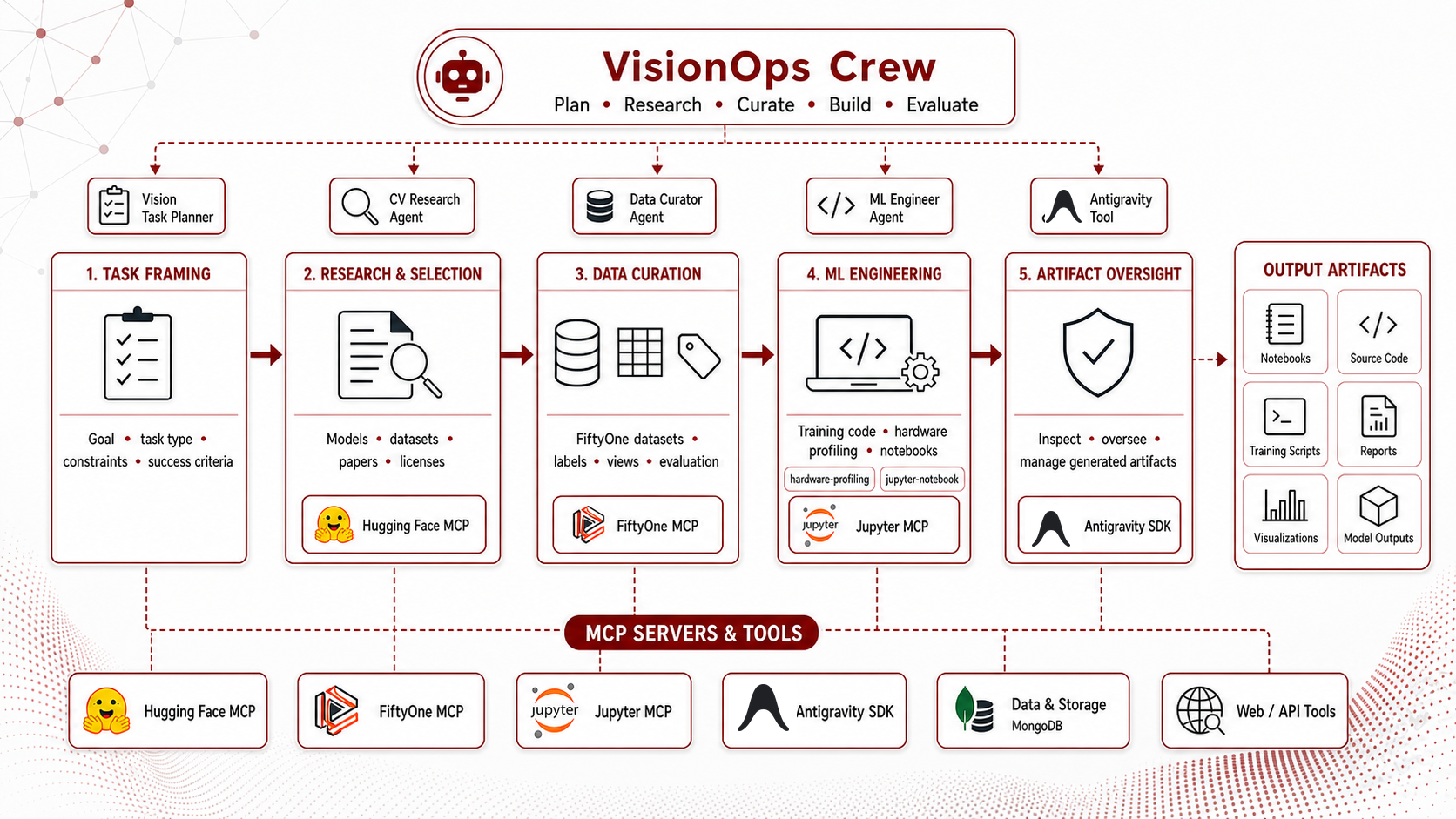
The underlying problem is context isolation. Researchers and practitioners may understand the relationships among the dataset schema, model family, and runtime constraints, but the individual tools involved do not share that context. visionops_crew addresses this gap by routing each stage through specialized agents while keeping the orchestrator responsible for preserving the task brief, consolidating evidence, tracking assumptions, and enforcing constraints across subsequent steps.
System Design: The Multi-Agent Coordinator Architecture
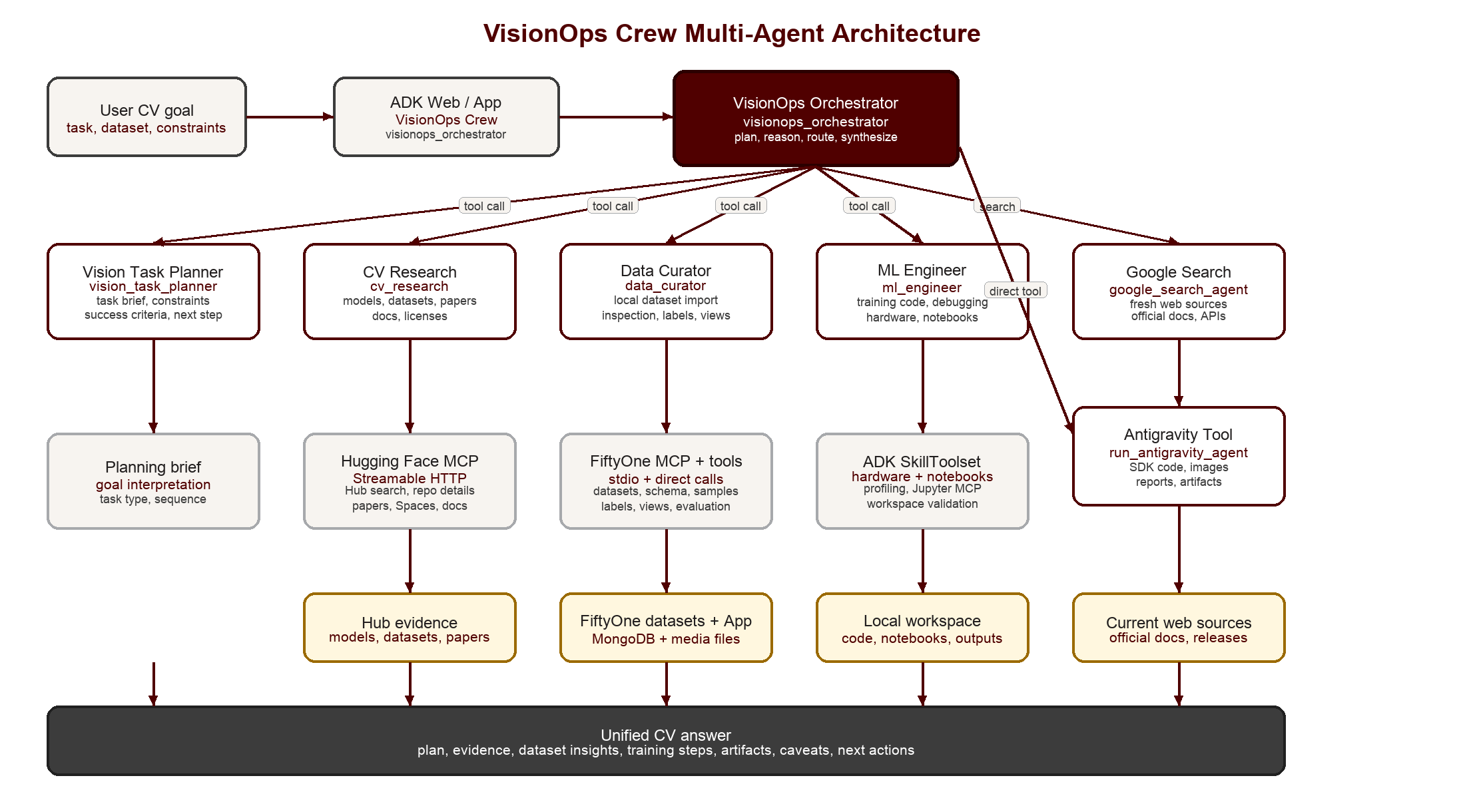
The application follows a hub-and-spoke architecture. At its center, the visionops_crew ADK application defines a root orchestrator that invokes specialized agents as tools. The orchestrator interprets objectives, routes tasks, preserves context, and synthesizes findings, while each specialist agent gathers evidence or performs actions within a clearly bounded domain.
This architecture is intentionally conservative. Giving a single monolithic agent access to every tool can blur responsibilities, allowing the same agent to search the web, modify local files, inspect datasets, and generate training code without clear boundaries between research, execution, and synthesis. In visionops_crew, tool access is partitioned according to each agent’s role. This separation makes prompts and behaviors easier to audit, reduces unintended tool use, and provides a clearer foundation for introducing confirmation gates around state-changing operations.
Specialist Agents and Their Domains
The assistant’s capabilities are distributed across specialized roles. Each role owns a bounded portion of the workflow and returns structured findings to the orchestrator:
- Vision Task Planner (
vision_task_planner): The planner translates broad requests into an operational task brief. It identifies the task type, expected annotation structure, missing constraints, appropriate evaluation metrics, execution risks, and recommended sequence of specialists. In research-oriented workflows, this establishes an explicit hypothesis about what must be observed and validated before implementation begins.
-
CV Research Agent (
cv_research): This specialist connects to the Hugging Face Hub through MCP. It retrieves relevant datasets, model cards, papers, Spaces, documentation, benchmark information, and licensing metadata. Its findings are treated as source-backed research evidence rather than local execution results. -
Data Curator Agent (
data_curator): This agent coordinates local, data-centric workflows. It can import Hugging Face datasets into FiftyOne, inspect dataset schemas, summarize label distributions, query samples, and launch the FiftyOne App for interactive visual inspection. Its purpose is to transform external dataset references into observable local evidence. Through direct tools and a local standard input/output (stdio) MCP session, it manages:-
load_huggingface_dataset: Downloads image or video samples from the Hugging Face Hub, materializes the assets on the local filesystem, and constructs structured FiftyOne datasets without requiring manually written import scripts. -
open_fiftyone_dataset: Launches an interactive FiftyOne App session on a local port for visually inspecting annotations, identifying prediction errors, and exploring high-dimensional embeddings using UMAP or t-SNE projections.
-
-
ML Engineer (
ml_engineer): This agent owns implementation-oriented tasks, including hardware-aware training plans, code review, local file inspection, validation commands, and notebook-based prototyping. It loads two modular ADK skills:hardware-profilingfor inspecting runtimes and accelerators, andjupyter-notebookfor durable exploratory analysis. The notebook skill is backed by a Jupyter MCP gateway, enabling notebooks to be created, edited, executed, and inspected through structured tool calls rather than loosely coordinated shell commands. -
Google Search Agent (
google_search_agent): This agent provides up-to-date information from official documentation and other sources outside the Hugging Face ecosystem, including software releases, API changes, compatibility details, and implementation guidance. -
Antigravity Tool (
run_antigravity_agent): Antigravity is registered as an opt-in tool at the root orchestrator level. This placement is deliberate: it ensures that artifact generation, image creation, report drafting, and large implementation tasks remain explicit user decisions. The wrapper records artifact roots and tool results, denies file writes by default, and enables creation or editing policies only after receiving confirmation.
Implementation Details: ADK and MCP Server Integration
This architecture only works if the boundaries are concrete in code. visionops_crew implements those boundaries through ADK agent composition, MCP-backed tool registration, local runtime inspection, notebook skills, and explicit artifact controls.
Orchestrator Setup
The root orchestrator, visionops_orchestrator, is instantiated as a standard ADK Agent. The important design choice is that specialist agents are registered as callable tools via AgentTool. This keeps the user conversation anchored in one root agent while still allowing domain-specific prompts and toolsets behind each specialist.
from google.adk.agents import Agent
from google.adk.apps.app import App
from google.adk.plugins import ReflectAndRetryToolPlugin
from google.adk.tools.agent_tool import AgentTool

from visionops_crew.agents.cv_research.agent import (
    root_agent as cv_research,
)
from visionops_crew.agents.data_curator.agent import (
    root_agent as data_curator,
)
from visionops_crew.agents.ml_engineer.agent import (
    root_agent as ml_engineer,
)
from visionops_crew.agents.vision_task_planner.agent import (
    root_agent as vision_task_planner,
)

search_agent = create_google_search_agent(
   model=os.getenv(
      "GOOGLE_SEARCH_MODEL",
      os.getenv("VISIONOPS_ORCHESTRATOR_MODEL", DEFAULT_MODEL),
   )
)
root_agent = Agent(
   model=os.getenv("VISIONOPS_ORCHESTRATOR_MODEL", DEFAULT_MODEL),
   name="visionops_orchestrator",
   description=(
      "A computer vision expert orchestrator that uses a planning specialist, "
      "Google Search, computer vision research, data curation, dataset "
      "operations, ML engineering support, and opt-in Antigravity super-agent "
      "support for robust CV workflows."
   ),
   instruction=VISIONOPS_CREW_ORCHESTRATOR_INSTRUCTION,
   tools=[
      run_antigravity_agent,
      AgentTool(agent=vision_task_planner),
      GoogleSearchAgentTool(agent=search_agent),
      AgentTool(agent=cv_research),
      AgentTool(agent=ml_engineer),
      AgentTool(agent=data_curator),
   ],
)
Integrating External Tools Such as Jupyter, FiftyOne, and Hugging Face through MCP and Skills
After the orchestrator determines which specialist should act, the next question is how that agent interacts with the appropriate external system. visionops_crew addresses this through MCP toolsets and modular skills rather than embedding platform-specific behavior directly into the root agent. This keeps the integration boundaries explicit: tools are discovered through structured schemas, invoked through ADK, and scoped to the specialist responsible for that domain.
The Hugging Face integration uses a remote MCP gateway to support Hub-based research, including access to models, datasets, documentation, papers, and related metadata. The FiftyOne integration runs a local fiftyone-mcp subprocess over standard input/output (stdio), allowing the Data Curator to inspect datasets within the same Python environment as the ADK application. This separation gives each specialist access to the tools it needs while preventing unrelated agents from invoking capabilities outside their assigned responsibilities.
from pathlib import Path
import sys
from google.adk.tools.mcp_tool.mcp_toolset import McpToolset
from google.adk.tools.mcp_tool.mcp_session_manager import (
    StdioConnectionParams,
    StdioServerParameters,
)

fiftyone_mcp_path = Path(sys.executable).with_name("fiftyone-mcp")

fiftyone_mcp_tools = McpToolset(
    connection_params=StdioConnectionParams(
        server_params=StdioServerParameters(
            command=str(fiftyone_mcp_path),
            env=dict(os.environ),
            cwd=str(Path(__file__).resolve().parent.parent),
        ),
        timeout=30.0,
    ),
)
The McpToolset class queries the MCP server's tool schemas and registers the resulting operations inside the ADK agent's scope. In practice, this means the Data Curator can inspect local dataset state while the orchestrator remains focused on routing and synthesis, not on the details of FiftyOne's SDK calls.
Local Hardware and Framework Auditing
Once the relevant data and model context has been established, implementation recommendations must still align with the available runtime environment. Hardware and framework state is therefore treated as a first-class component of the workflow because it directly constrains feasible models, batch sizes, numerical precision, and training strategies. Any recommendation that overlooks memory capacity, accelerator compatibility, or installed framework versions remains incomplete.
The ml_engineer uses a modular ADK skill named hardware-profiling to inspect the platform available to the ADK runtime. Through the skill boundary, it invokes scripts/profiling_tools.py to collect information about the CPU, system memory, installed machine learning frameworks, framework versions, and available accelerator support. The agent uses this evidence to produce hardware-aware implementation guidance and select training parameters that are appropriate for the actual execution environment.
def check_hardware_specification() -> dict:
    """Inspect local CPU, memory, and operating system platform details."""
    info = {
        "platform": {
            "system": platform.system(),
            "release": platform.release(),
            "machine": platform.machine(),
            "processor": platform.processor(),
            "python": platform.python_version(),
            "python_executable": os.sys.executable,
        },
        "cpu": {"logical_cores": os.cpu_count()},
        "memory": {}
    }
    if platform.system() == "Darwin" and shutil.which("sysctl"):
        memsize = subprocess.run(["sysctl", "-n", "hw.memsize"], capture_output=True, text=True).stdout.strip()
        if memsize.isdigit():
            info["memory"]["total_gb"] = round(int(memsize) / (1024**3), 2)
    return info

def check_framework_availability() -> dict:
    """Inspect availability and versions of major ML and DL frameworks."""
    # Dynamic checks for torch, jax, sklearn, tensorflow, transformers, timm, fiftyone...
    ...

def check_accelerator_availability() -> dict:
    """Inspect availability of hardware accelerators (CUDA/MPS/TPUs)."""
    # Checks nvidia-smi command and framework-specific device listings...
    ...
This profiling does not attempt to characterize the user’s complete deployment environment. It only describes the runtime that the agent can directly observe. This distinction is important for researchers and practitioners who prototype locally but train or deploy on remote clusters. In such cases, the target hardware and runtime constraints must be provided explicitly in the task brief so that the resulting recommendations reflect the intended execution environment.
Interactive Prototyping with Jupyter Notebooks
After inspecting the runtime environment, the ML Engineer can use Jupyter notebooks to perform exploratory analysis and implementation checks without losing provenance. Rather than treating notebooks as temporary scratch space, visionops_crew manages them as structured, persistent, and auditable artifacts.
The ml_engineer accesses notebooks through the jupyter-notebook skill, backed by a standard input/output (stdio) MCP connection to jupyter-mcp-server@latest. This integration allows the agent to create, open, edit, execute, and inspect notebook cells through structured tool calls while preserving the complete notebook for subsequent review and reuse.
When beginning exploratory analysis or validating a training implementation, the agent can create or load a notebook—such as pytorch_image_classifier.ipynb—and add cells incrementally as the investigation progresses. The ADK wrapper configures the Jupyter MCP toolset over stdio as follows:
from google.adk.tools.mcp_tool.mcp_toolset import McpToolset
from google.adk.tools.mcp_tool.mcp_session_manager import (
    StdioConnectionParams,
    StdioServerParameters,
)

jupyter_mcp_toolset = McpToolset(
    connection_params=StdioConnectionParams(
        server_params=StdioServerParameters(
            command="uvx",
            args=["jupyter-mcp-server@latest"],
            env=dict(os.environ)
        ),
        timeout=30.0
    )
)
Cell-level MCP tools—including insert_cell, edit_cell_source, execute_cell, and list_kernels—allow the agent to develop and validate prototypes incrementally. This is particularly valuable in research workflows because intermediate diagnostics, such as class-distribution histograms, sample grids, preprocessing checks, and training curves, remain directly associated with the code and execution context that produced them.
Antigravity SDK as an Opt-In Orchestrator Tool
The default workflow covers model and dataset research, local data inspection, runtime auditing, and notebook-based prototyping. Each activity follows a predictable route: model and dataset research remains assigned to the CV Research Agent, local dataset operations remain with the Data Curator, and notebook-based experimentation remains the responsibility of the ML Engineer.
The Antigravity SDK complements these specialist components as an opt-in tool exposed at the root orchestrator boundary. When explicitly requested by the user or selected by the orchestrator, Antigravity can inspect, validate, and oversee artifacts produced by other agents. It can also handle implementation-intensive tasks that benefit from more advanced, multi-step reasoning, such as generating image assets, drafting validation reports, inspecting project structures, improving code quality, and producing proposed notebooks or scripts.
Keeping Antigravity outside the standard routing path makes its use explicit and prevents it from bypassing the established responsibilities and tool boundaries of the specialist agents. It operates as a controlled extension of the architecture rather than as a default capability available throughout the system.
The Antigravity SDK integration is implemented in `src/visionops_crew/agents/visionops_orchestrator/tools.py. The tool first creates a local configuration using the workspace and artifact paths:
from google.antigravity import LocalAgentConfig

return LocalAgentConfig(
   system_instructions=ANTIGRAVITY_EXPERT_INSTRUCTIONS,
   model=os.getenv("ANTIGRAVITY_MODEL", "gemini-3.5-flash"),
   workspaces=[str(paths["workspace"])],
   api_key=os.getenv("GEMINI_API_KEY"),
   save_dir=str(paths["sessions"] / "expert"),
   app_data_dir=str(paths["app_data"]),
   policies=_build_policies(
      allow_file_edits=allow_file_edits
   ),
   hooks=extra_hooks,
)
The task is then executed asynchronously through run_antigravity_agent. The function validates the request, configures the workspace and artifact paths, starts the Antigravity agent, and sends the task using agent.chat(). It also tracks created or modified artifacts and returns them alongside the agent’s response and tool results.
Within the ADK application, this function applies strict execution policies. File creation and editing remain disabled unless the user confirms the specific write operation, and shell-command execution is blocked within the non-interactive tool path. Image generation is permitted, while created or modified artifacts are tracked only within explicitly configured artifact roots. These controls make Antigravity a governed extension of visionops_crew that operates within the system’s established agent and tool boundaries.
async def run_antigravity_agent(
        task: str,
        root_folder: str = "",
        allow_file_edits: bool = False,
) -> dict[str, Any]:
   """Run Antigravity for an explicitly requested task.

   Args:
       task: Code, image, analysis, notebook, or artifact-generation request.
       root_folder: Absolute base folder for `.env`, `.antigravity/`, and
           `antigravity-workspace/`. If empty, `ANTIGRAVITY_ROOT_DIR` or the
           ADK process working directory is used.
       allow_file_edits: Whether to allow Antigravity create/edit file tools.
           Use only after the user confirms the exact file-writing action.

   Returns:
       Antigravity text output, resolved storage paths, detected artifacts, and
       captured tool results.

   Raises:
       ValueError: If `task` is blank.
       RuntimeError: If Antigravity configuration, connection, or execution
           fails.
   """
   if not task.strip():
      raise ValueError("task is required.")

   try:
      paths = _configure_antigravity_paths(root_folder)
      artifact_hook = ArtifactTrackingHook()
      roots = _artifact_roots(paths=paths, include_workspace=allow_file_edits)
      before_files = _snapshot_files(roots)

      async with AntigravityAgent(
              _build_antigravity_config(
                 paths=paths,
                 allow_file_edits=allow_file_edits,
                 extra_hooks=[artifact_hook],
              )
      ) as agent:
         response = await agent.chat(task.strip())
         result = await response.text()

      after_files = _snapshot_files(roots)
      artifact_changes = _diff_snapshots(before_files, after_files)
      return {
         "status": "success",
         "result": result,
         "root_folder": str(paths["root"]),
         "workspace": str(paths["workspace"]),
         "artifact_root": str(paths["artifacts"]),
         "artifact_roots": [str(root) for root in roots],
         "created_artifacts": artifact_changes["created"],
         "updated_artifacts": artifact_changes["updated"],
         "tool_results": artifact_hook.tool_results,
      }
   except AntigravityValidationError as exc:
      raise RuntimeError(
         "Antigravity configuration is invalid. Check GEMINI_API_KEY, "
         "ANTIGRAVITY_MODEL, root_folder, and workspace settings."
      ) from exc
   except AntigravityConnectionError as exc:
      raise RuntimeError(
         "Antigravity connection dropped. Retry the request or check the "
         "local network/session state."
      ) from exc
   except AntigravityExecutionError as exc:
      raise RuntimeError(f"Antigravity execution failed: {exc}") from exc
End-to-End Walkthrough: An Audited Curation and Training Plan
The architecture becomes most valuable when a request spans multiple systems. Consider a task that combines local dataset operations with hardware-aware implementation guidance:
Load
Humayoun/SkinDiseaseinto FiftyOne, inspect its label schema, and recommend a baseline image-classification training plan for my local hardware.
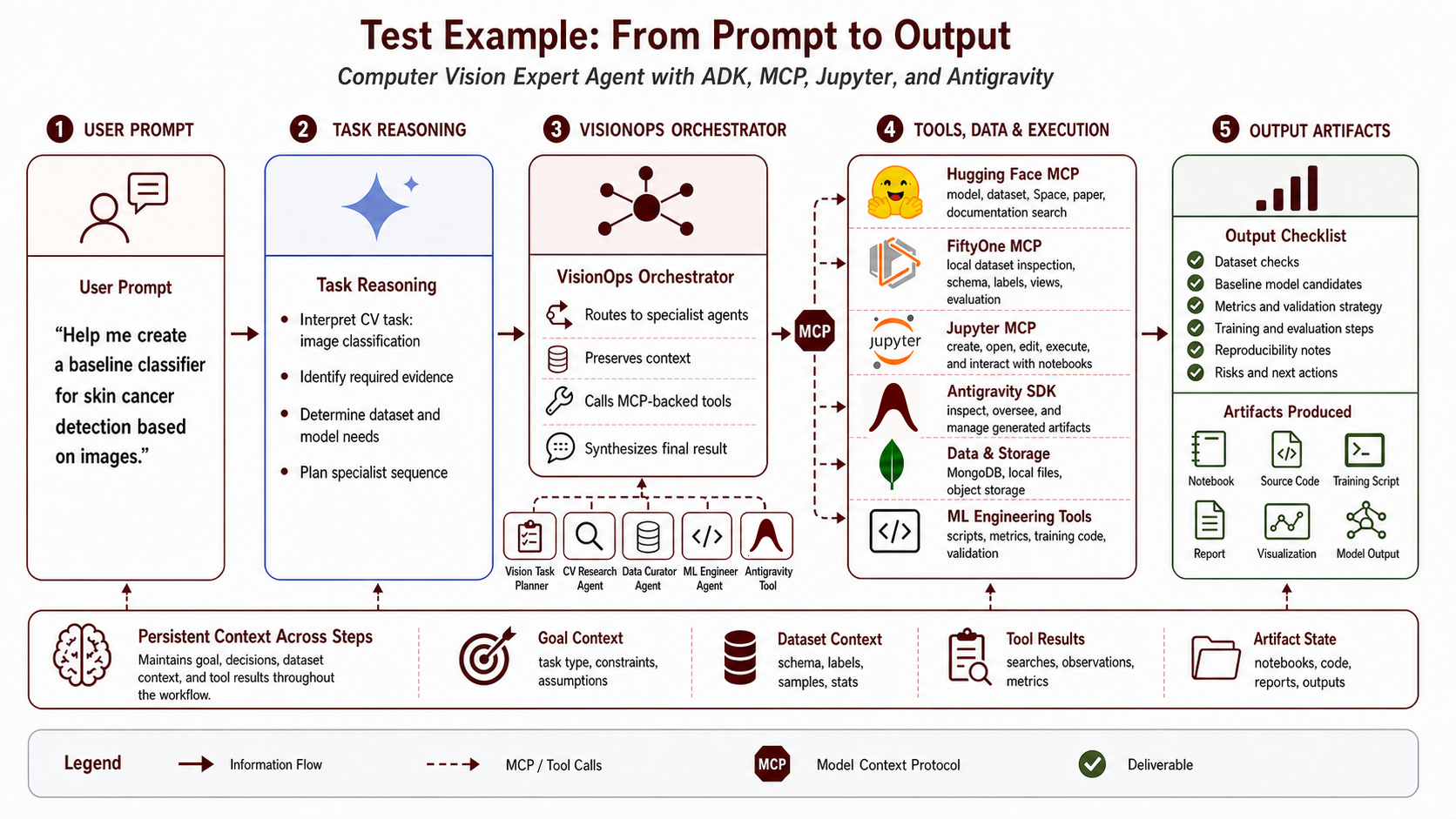
The workflow is intentionally sequential. The system first establishes the task, dataset, and runtime evidence, and then uses that evidence to produce implementation guidance:
-
Task framing: The orchestrator invokes
vision_task_planner, which identifies the request as an image-classification task, records unresolved constraints, and recommends inspecting the dataset before generating training guidance. -
Data ingestion: The orchestrator delegates to
data_curator, which uses the customload_huggingface_datasettool to retrieve a bounded sample from theHumayoun/SkinDiseaserepository. The agent materializes the media under the configured dataset directory, creates a persistent FiftyOne dataset, and can launch the FiftyOne App for interactive inspection. -
Schema inspection: The Data Curator performs local schema and aggregation queries to identify the media field, semantic label field, class cardinality, label distribution, and any immediate missing-label or imbalance concerns before implementation begins.
-
Hardware and framework audit: Once the dataset context has been established, the orchestrator invokes
ml_engineer. The agent inspects the observable runtime and reports relevant platform, framework, and accelerator details, such as macOS, Apple Silicon, and PyTorch MPS support. -
Synthesis: The orchestrator combines the task brief, dataset evidence, and runtime observations into a coherent implementation plan. On Apple Silicon, for example, it can recommend a PyTorch transfer-learning baseline configured with
device = "mps"rather than incorrectly assuming CUDA availability.
System Limitations and Safety Constraints
Although the walkthrough demonstrates how the system preserves evidence across stages, the architecture still has important operational and scientific limitations:
-
Latency and cost: Delegating tasks across multiple agents increases token consumption and wall-clock latency. This architecture is most appropriate for requests that span several systems or require traceable evidence, rather than tasks that can be resolved through a single lookup.
-
Local side effects: Dataset imports, notebook execution, file modifications, and command execution can alter local state. These operations should remain behind explicit confirmation boundaries and be recorded as part of the workflow.
-
Runtime observability: Hardware profiling only describes the environment visible to the ADK runtime. It cannot infer the configuration of remote training or deployment infrastructure unless the user explicitly provides that information.
-
Scientific validity: The system can organize evidence, identify potential issues, and propose baseline implementations, but it cannot guarantee dataset suitability, freedom from bias, adequate statistical power, clinical validity, or deployment readiness. These remain domain-specific research and validation responsibilities.
-
Tool and schema drift: MCP servers, external APIs, model cards, and dataset schemas can evolve over time. Reproducible workflows should therefore record dataset versions, sample sizes, model revisions, tool configurations, and local package versions whenever results must be replicated or audited.
Where This Goes Next
visionops_crew demonstrates a practical architectural pattern for agentic computer vision operations: centralize orchestration, constrain specialist tool access, preserve evidence across stages, and make local execution boundaries explicit. The system is not intended to replace experimental judgment. Instead, it provides a coordination layer that maintains context across model research, dataset inspection, runtime profiling, notebook prototyping, and artifact generation.
The next development priorities focus on reproducibility and evaluation: capturing structured provenance for dataset imports, preserving model and dataset revision metadata, integrating FiftyOne similarity search for anomaly discovery, and adding benchmark-specific evaluation templates. Integrating experiment-management platforms such as MLflow or Weights & Biases would also enable structured tracking of configurations, metrics, artifacts, hardware metadata, and model versions across training runs. Together, these capabilities could support closed-loop training workflows in which the system compares experiments, diagnoses failures, and recommends subsequent runs based on recorded evidence without obscuring execution details or intermediate findings from the user.
If this direction is useful for your computer vision workflow, try the project on GitHub: OpenSciML/visionops_crew. Issues, ideas, examples, dataset adapters, evaluation templates, and pull requests are welcome.